
How to Play Strands Game on my Mobile Device?
If you enjoy daily word puzzles, Strands is one of the most exciting challenges available today. The puzzle, featured on the games platform of The New York Times, asks players to find hidden theme words inside a grid of letters while uncovering a special word known as the spangram.
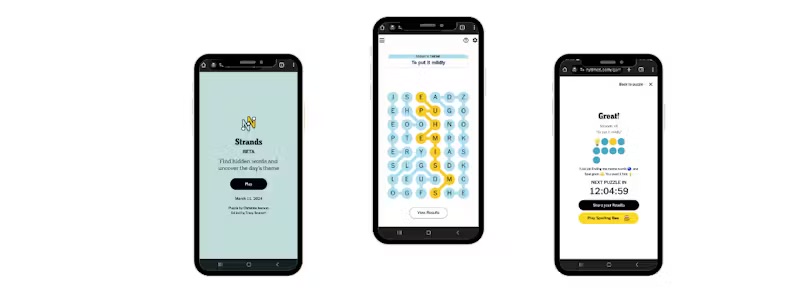
How to Play Strands on Mobile: Complete Step-by-Step Guide
The good news is that you can easily play Strands directly from your smartphone or tablet without downloading any app. Whether you use iOS or Android, the game works smoothly in a mobile browser. Here’s a simple step-by-step guide to start playing Strands on mobile.
Step 1: Open Your Mobile Web Browser
First, open a web browser on your phone. The game works well with most modern browsers, including:
- Safari (for iPhone and iPad)
- Chrome (for Android devices)
- Firefox or Edge
Make sure your internet connection is stable so the puzzle loads properly.
Step 2: Search for the Official Strands Game
Next, tap the address bar in your browser and search for:
“NYT Strands”
or
“New York Times Games Strands.”
Press enter and you will see several results. Look for the link that leads to the official puzzle page on the New York Times Games website.
Step 3: Open the Strands Puzzle Page
Tap the official link to open the puzzle. Once the page loads, you’ll see the Strands letter grid along with a short description explaining the day’s puzzle theme.
The typical Strands board contains 48 letters arranged in a 6×8 grid. Your task is to connect letters to form words related to the puzzle’s theme.
Step 4: Select Letters to Form Words
On mobile devices, you simply use your finger to interact with the puzzle.
To create a word:
- Tap the first letter in the grid.
- Drag your finger across adjacent letters.
- Release your finger when the word is complete.
Letters can connect vertically, horizontally, or diagonally, and words can change direction while forming.
Step 5: Find the Theme Words
Each puzzle includes several theme words related to the puzzle title. These words can appear anywhere in the grid and may twist across multiple directions.
When you find a correct theme word, it will be highlighted and locked into the puzzle.
Step 6: Discover the Spangram
The most important word in the puzzle is the spangram.
The spangram:
- Explains the puzzle’s theme
- Connects two opposite sides of the grid
- Helps reveal the remaining theme words
Finding the spangram often makes the rest of the puzzle much easier to solve.
Step 7: Continue Until the Puzzle Is Complete
Keep searching for theme words until all words have been discovered. Once you complete the puzzle, you’ll see a summary showing your progress and results.
If you ever get stuck, the game may offer hints after finding valid dictionary words that are not part of the theme.
How Many Words Do You Need to Find?
The number of words varies depending on the puzzle. Most Strands puzzles include:
- One spangram
- Several theme words connected to the puzzle topic
Typically, players need to find around 6–8 words to finish the puzzle.
Is Strands Difficult on Mobile?
The difficulty level of Strands changes daily. Some puzzles are easier and rely on common themes, while others require stronger vocabulary and pattern recognition skills.
Fortunately, the mobile version works very smoothly, making it easy to trace words and explore the grid.
Final Thoughts
Playing Strands on your mobile device is a fun and convenient way to challenge your brain anytime. With just a browser and an internet connection, you can solve daily puzzles, discover hidden words, and improve your vocabulary. Also Play 7 Hidden Tricks to Solve Strands Puzzle Faster
Whether you’re playing during a quick break or relaxing at home, Strands offers a satisfying word puzzle experience right on your phone.